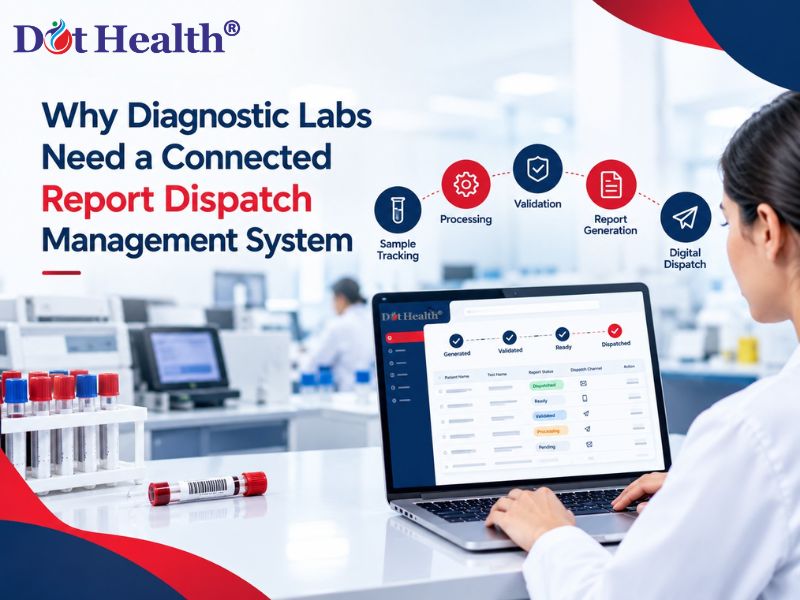
Why Diagnostic Labs Need a Connected Report Dispatch Management System
For a diagnostic laboratory, generating an accurate test report is only one part of the process. The report must also reach the patient, doctor, or authorised recipient efficiently after validation. When report dispatch depends heavily on manual processes, delays, repeated follow-ups, and difficulty tracking report status can affect the overall laboratory workflow.
This is where a connected report dispatch management system can make a difference.
By connecting patient registration, test processing, barcode tracking, result management, report generation, and report dispatch, diagnostic laboratories can create a more organised digital workflow. Instead of handling report delivery as a separate task, laboratories can manage it as part of the complete Laboratory Information System (LIS) workflow.
For diagnostic centres handling increasing numbers of tests every day, connected laboratory management software can help improve report accessibility while reducing repetitive manual work.
What Is a Report Dispatch Management System?
A report dispatch management system is a software-based solution that helps diagnostic laboratories manage the process of releasing and delivering completed test reports.
In a traditional workflow, laboratory staff may need to:
- Check whether the report is completed
- Verify the report status
- Generate or print the report
- Contact the patient
- Send the report manually
- Handle requests for duplicate reports
- Track pending reports
A connected system brings these activities into a centralised workflow.
The process can look like:
Patient Registration → Test Booking → Sample Collection → Barcode Tracking → Test Processing → Result Entry → Result Validation → Report Generation → Report Dispatch
This connected approach helps diagnostic laboratories maintain better visibility throughout the testing and reporting process.
Why Diagnostic Labs Should Connect Report Dispatch With Their Laboratory Workflow
Report dispatch should not operate as an isolated activity. It depends on information generated at several earlier stages of the laboratory process.
For example, the report must be con
nected to the correct patient, test order, sample and validated result before it can be released.
When these processes are connected through diagnostic lab management software, information can move through the workflow without unnecessary duplication of work.
1. Reduce Delays in Report Delivery
A report may be completed by the laboratory but still remain pending for delivery because staff have to manually process the dispatch.
A connected workflow can reduce this gap by linking report generation with the configured dispatch process.
This means the focus can shift from manually managing every report to managing exceptions and reports that actually require staff attention.
2. Reduce Manual Follow-Ups
Patients frequently contact diagnostic centres to ask whether their reports are ready.
If patients can receive a notification or access their reports digitally through the available communication or portal features, unnecessary follow-up calls can be reduced.
This can also reduce the workload for reception and front-desk teams.
3. Improve Report Tracking
With manual report delivery, tracking the status of every report can become difficult.
A connected laboratory system can provide better visibility into stages such as:
Report Pending → Report Generated → Report Validated → Report Ready → Report Dispatched
This helps laboratory administrators identify where delays are occurring.
4. Connect Report Delivery With Patient Records
A diagnostic report should be associated with the correct patient and test information.
When report generation and patient management are connected, the report can remain linked to the patient's digital record.
This makes it easier for authorised users to access previous reports when required.
How a Connected Report Dispatch Workflow Works
A connected report dispatch process begins well before the report is generated.
Patient Registration and Test Booking
The patient's information and requested tests are recorded in the system.
The test order becomes the foundation for the remaining laboratory workflow.
Sample Collection and Barcode Tracking
After collection, the sample can be identified using a unique barcode.
Barcode tracking helps laboratory teams associate the sample with the correct patient and test throughout the testing process.
This creates traceability from sample collection to final report.
Laboratory Processing and Analyzer Integration
The sample is processed according to the required laboratory workflow.
Where supported, analyzer integration can transfer test results into the laboratory system, reducing repetitive manual data entry.
This is particularly useful for laboratories handling a high volume of diagnostic tests.
Result Validation
Before a report is released, the results can go through the required verification and approval process.
This is an important stage because report dispatch should occur only after the appropriate validation and authorisation.
Report Generation
After validation, the system generates the diagnostic report using the configured report format.
The report can contain the relevant patient information, test results, reference ranges, laboratory details and other required information.
Report Dispatch
Once the report is approved and ready, it can be delivered through the configured digital or physical channels.
Depending on the laboratory's setup, these may include:
- Patient portal
- Email
- SMS notification or report link
- WhatsApp integration
- Doctor access
- Printed reports
The important point is that dispatch becomes connected with the report lifecycle instead of being treated as a completely separate manual activity.
Benefits of Connected Report Dispatch for Diagnostic Laboratories
Faster Access to Reports
Connecting report generation with dispatch can help reduce unnecessary waiting between report completion and patient access.
Better Patient Experience
Patients can get easier access to their diagnostic reports without always needing to visit the laboratory to collect a printed copy.
Less Repetitive Work
Laboratory and front-desk teams spend less time performing repetitive report delivery tasks.
Better Operational Visibility
Administrators can get a clearer view of pending and completed reports, making it easier to identify workflow bottlenecks.
Improved Communication With Doctors
Diagnostic laboratories often work with hospitals, clinics and referring doctors.
A connected healthcare software system can support easier access to reports for authorised healthcare professionals through the available doctor or hospital workflows.
Centralised Report History
Keeping reports connected with patient records makes it easier for authorised users to access previous diagnostic information when needed.
Why Barcode Tracking and Report Dispatch Should Work Together
Barcode tracking is not useful only during sample collection.
It can contribute to the complete laboratory workflow.
For example:
Patient → Test Order → Barcode → Sample → Processing → Result → Validation → Report → Dispatch
When these stages are connected, the laboratory can maintain better traceability of each sample and its corresponding report.
This is especially valuable for diagnostic centres where multiple samples and tests are processed simultaneously.
Why Analyzer Integration Matters for Report Management
Many diagnostic laboratories use automated analyzers to process tests.
If analyzer results and laboratory software are connected, results can move digitally into the appropriate workflow instead of requiring staff to repeatedly transfer information.
The workflow can then continue from:
Analyzer Result → Result Verification → Report Generation → Report Dispatch
This reduces unnecessary data handling and creates a more connected laboratory environment.
Why DotHealth Is Suitable for a Connected Diagnostic Lab Workflow
DotHealth is healthcare software designed to connect important healthcare operations through a centralised digital environment.
For diagnostic laboratories, its laboratory management capabilities support key processes including patient and test management, barcode-based sample tracking, analyzer integration, result management and report generation.
This allows laboratories to connect different stages of their workflow rather than managing every activity separately.
With a connected approach, the journey can move from:
Patient Registration → Sample Collection → Barcode Tracking → Laboratory Processing → Result Management → Report Generation → Report Dispatch
This can help diagnostic centres improve workflow visibility, reduce repetitive manual activities, and provide a more convenient report-access experience for patients and healthcare professionals.
For laboratories looking to adopt a broader healthcare management platform, DotHealth can also connect laboratory operations with other healthcare functions within the same ecosystem.
What Should You Look for in Diagnostic Lab Management Software?
Before selecting a laboratory management system, diagnostic centres should consider whether the software provides:
- Patient and test management
- Barcode-based sample tracking
- Analyzer integration
- Result entry and validation
- Automated report generation
- Report dispatch management
- Patient report history
- Digital report access
- Doctor or hospital connectivity
- Secure user access
- Report status tracking
- Customisable report formats
- Multi-location support
The right combination will depend on the laboratory's size, test volume, workflow and operational requirements.
Conclusion
Report dispatch is an important part of the diagnostic laboratory workflow. A report that has been accurately generated still needs to reach the right patient or healthcare professional efficiently.
By connecting LIMS, patient management, barcode tracking, analyzer integration, result validation, report generation and report dispatch, diagnostic laboratories can create a more consistent end-to-end workflow.
Instead of managing report delivery manually, laboratories can use connected diagnostic lab management software to improve visibility, reduce repetitive tasks and provide easier access to completed reports.
With DotHealth, diagnostic centres can bring essential laboratory processes together within a connected healthcare software environment—from sample collection and tracking to result management and report generation.
For more information about DotHealth, visit dothealth.co.in.
Frequently Asked Questions
What is report dispatch management in a diagnostic lab?
Report dispatch management is the process of managing the release and delivery of completed diagnostic reports to patients, doctors, hospitals, or other authorised recipients.
Why is connected report dispatch important for diagnostic laboratories?
It connects report generation and delivery with the wider laboratory workflow, helping reduce manual work, improve report tracking, and provide faster access to completed reports.
How does barcode tracking support report management?
Barcode tracking connects a sample with its patient and test order throughout the laboratory process. This improves traceability from sample collection through result processing and reporting.
Can report dispatch be connected with LIMS?
Yes. Report dispatch can be integrated into a broader LIMS workflow so that report generation, validation, patient records, and delivery are managed as connected processes.
How does analyzer integration help diagnostic labs?
Analyzer integration can transfer test results into the laboratory software workflow, reducing repetitive manual data entry and helping connect testing with result management and report generation.
Can patients receive diagnostic reports digitally?
Yes. Depending on the software configuration and available integrations, diagnostic reports can be made accessible through digital channels such as patient portals, email, SMS or messaging integrations.
How does DotHealth support diagnostic laboratories?
DotHealth supports connected healthcare and laboratory workflows, including patient and test management, barcode-based sample tracking, analyzer integration, result management and report generation.